Zero Trust AI Orchestrator V 3.0.1

AI Runtime & Code Orchestration Platform
That Works Where Your Code Lives.

Forget chat bots giving "copy this code" advice. RuntimeForce is an autonomous development environment for local machines and remote SSH servers with multi-model orchestration, eternal graph memory, and zero source code leakage.

Zero Trust. Local First. Multi-Model Orchestration.
Windows macOS Linux
RuntimeForce — Autonomous IDE Runtime
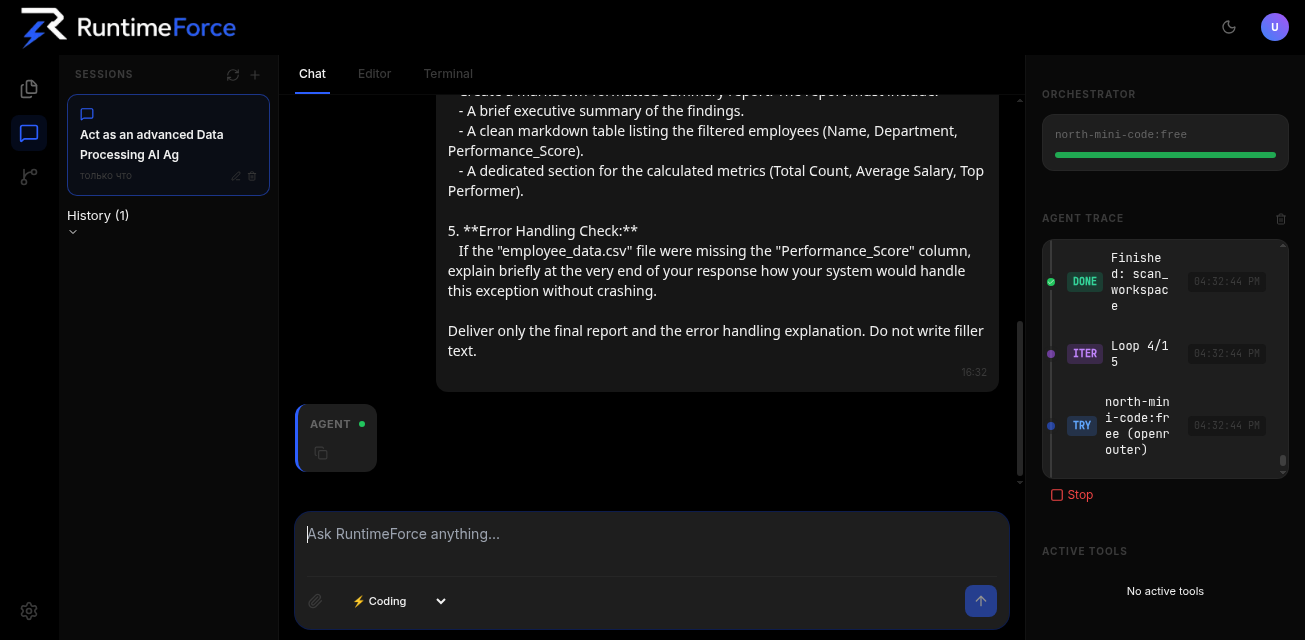
RuntimeForce Interface
Unified Multi-Provider Matrix

Plug Any Model. Switch in Milliseconds.

Groq LPU (500–1000+ tok/s)
Google Gemini 2.5 / 2.0
Cerebras WSE
SambaNova Cloud
OpenRouter Free
Ollama Offline
LM Studio Local
Anthropic Claude 3.5 Sonnet
OpenAI GPT-4o
DeepSeek Coder
xAI Grok
Groq LPU (500–1000+ tok/s)
Google Gemini 2.5 / 2.0
Cerebras WSE
Free Cloud Providers

💡 Tip: Free cloud providers (Groq, Gemini, SambaNova, Cerebras) deliver sub-second 500-1000 tok/s performance with zero hardware load.

Local Models (Ollama & LM Studio)

🏠 Tip: 100% offline development. Your source code, terminal sessions, and knowledge graph never leave your device. Zero API costs.

Pro Tier Providers

Tip: Connect personal BYOK keys or use monthly AI Credits for high-reasoning tasks with Claude 3.5 Sonnet, GPT-4o, DeepSeek, and Grok.

Install in 10 Seconds

One command setup. Installs RuntimeForce in an isolated environment and opens your browser directly.

Linux & macOS

Automated 1-Click Shell Script

curl -fsSL https://runtimeforce.dev/install.sh | bash

Windows

PowerShell 1-Click Script

irm https://runtimeforce.dev/install.ps1 | iex
Launches locally at http://127.0.0.1:8000. Python 3.10+ required.
Manual Installation Guide & Step-by-Step CLI Setup

Linux & macOS Manual Setup

# 1. Clone repository
git clone https://github.com/Georgediego/runtimeforce-app.git
cd runtimeforce-app
# 2. Virtual environment and dependencies
python3 -m venv venv && source venv/bin/activate
pip install -r requirements.txt
# 3. Launch local runtime IDE
python3 -m app.main

Windows PowerShell Manual Setup

# 1. Clone repository
git clone https://github.com/Georgediego/runtimeforce-app.git
cd runtimeforce-app
# 2. Virtual environment and dependencies
python -m venv venv; .\venv\Scripts\Activate.ps1
pip install -r requirements.txt
# 3. Launch local runtime IDE
python -m app.main

Built for Runtime-Centric Workflows

Not another editor plugin. A full orchestration layer for your code, servers, and AI models.

Local File System

Reads and edits files directly on your machine. Zero cloud upload, zero data leakage.

Native SSH Execution

Runs commands on remote servers as natively as localhost. Keys encrypted with AES-256-GCM.

Git-Aware Workflows

Knows commit history, branches, and diffs. Safe edits with full rollback capability.

Local LLMs (Ollama)

Run DeepSeek, Llama, Qwen locally. Zero cost, zero latency, zero data leakage.

Cloud AI Models

Claude, GPT-4o, Gemini — connect top models only when you really need them.

Zero Trust Architecture

Your code never leaves your machine. The cloud is just a stateless proxy for LLM requests.

Multi-Model Orchestration

Don't pick a model — pick a strategy. The orchestrator routes tasks to the best model automatically.

Auto

Default mode. Orchestrator decides based on complexity, cost, and latency.

Code

Prioritizes Claude Sonnet, GPT-4o, DeepSeek Coder for refactoring.

Analytics

Long-context reasoning models for research and complex decisions.

Consensus

Multiple models debate. Critique each other. Find the optimal solution.

Knowledge Base

Frequently Asked Questions

Key questions on local runtime development and data privacy.

1. What is RuntimeForce and how does it differ from Cursor or Windsurf?

Cursor and Windsurf are editor-centric wrappers around VS Code that rely on cloud servers. RuntimeForce is an AI Runtime Environment centered around local shell execution, remote SSH VPS clusters, and multi-model orchestration with complete data sovereignty.

2. Can I use RuntimeForce completely for free?

Yes. The Free plan is 100% functional: connect free BYOK API keys (Groq, Gemini, SambaNova, Cerebras) or run local offline models (Ollama, LM Studio) with zero AI cost.

3. What are AI Credits and when are they used?

AI Credits are consumed exclusively when accessing managed cloud models through our proxy in Pro (5,000 credits/mo) and Studio (15,000 credits/mo). When using your own API keys, zero AI Credits are consumed.

4. Are my SSH keys, Git tokens, and source code safe?

Yes. All sensitive credentials are encrypted locally with AES-256-GCM and stored solely in your local SQLite database (runtime.db). The SaaS server never has access to your servers or filesystem.

5. Does RuntimeForce work offline without internet?

Yes. In LOCAL mode with Ollama or LM Studio, you can work 100% offline. Pro/Studio subscribers get a 48-hour Offline Grace Period for offline license verification.

Ready to Orchestrate AI Locally?

Install in one command. Start building with AI that works directly inside your filesystem.